7 Mistakes When Choosing a Kraken CTR Tool Alternative
Kraken users are hunting for a credible CTR tool alternative, and the wrong pick costs them wasted credits. Some platforms bill for visits you can't verify, skip Bing or Maps, and blur desktop and mobile targeting into one setting.
This article walks through seven mistakes buyers make when comparing Kraken CTR tool alternatives, from missing screenshot proof to unclear credit models. By the end, you'll know which questions to ask and whether CTRTool fits your campaign needs.
What Is CTRTool? The CTR Tool Behind the Kraken Alternative Question
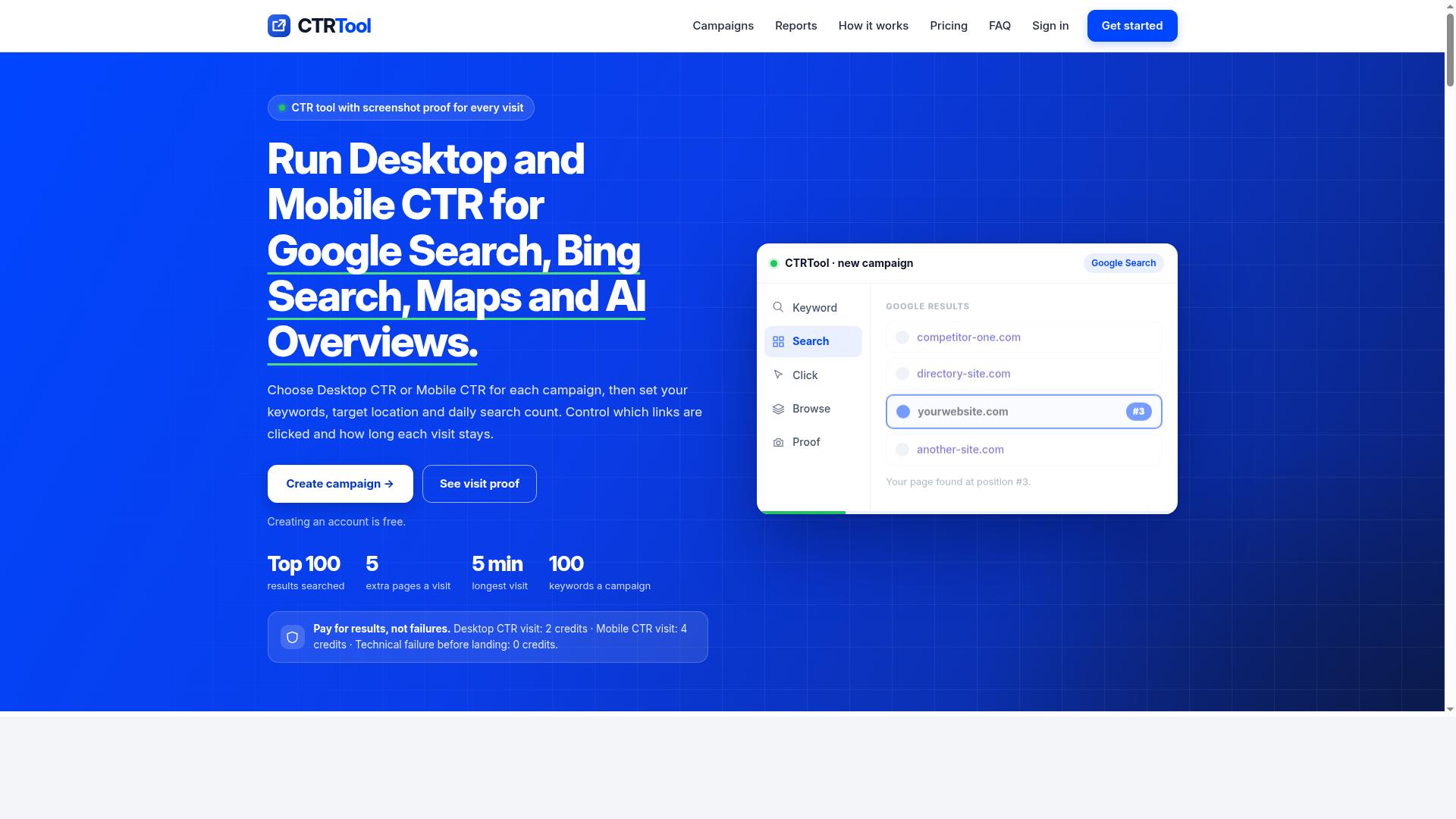
CTRTool is a SaaS platform that runs desktop and mobile CTR campaigns for Google Search, Bing Search, Google Maps, and AI Overviews, providing screenshot proof for every visit. It sits in the CTR manipulation category, a niche where tools simulate organic clicks to influence click-through rate and, by extension, SERP ranking.
The core idea is straightforward. Instead of relying only on on-page search engine optimization, a CTR tool adds controlled search activity on top of it. Users pick a campaign type, define their targets, and let the platform generate visits that mirror how real searchers behave.
CTRTool structures this through two campaign modes, Desktop CTR and Mobile CTR, chosen per campaign. Within each one, users set keywords, target location, and daily search count, then control which links are clicked and how long each visit stays. That level of control matters because dwell time and session duration are part of what separates a believable visit from a hollow one.
Proof is built into the model. Every visit comes with a screenshot, so users can see what actually happened rather than trusting a dashboard number alone. The platform is also upfront about limits: its own site states that automated visits do not guarantee rankings. That honesty is worth noting, since CTR is one signal among many in how a Google algorithm evaluates a page.
This is the context behind the Kraken CTR tool alternative question. Readers comparing options want to know what a tool actually does before judging it, and CTRTool's answer is a defined set of campaign types, targeting controls, and visit-level evidence. Whether it fits a given strategy depends on goals, but the function itself is clear and documented.
7 Mistakes When Choosing a Kraken CTR Tool Alternative - And How CTRTool Avoids Them
Selecting a Kraken CTR tool alternative often goes wrong when buyers overlook critical operational details that separate reliable tools from risky click bots. Most of these mistakes only surface after a campaign is already running, when wasted credits and confusing analytics make the problem obvious.
The seven pitfalls below cover the areas where CTR manipulation tools most often fall short: proof, platform reach, device control, and the accuracy of the traffic they deliver. Each one is common enough that buyers should check for it before committing to any tool.
CTRTool addresses each mistake through specific features rather than general promises. The first three are covered here, with the remaining pitfalls following in the sections below.
Mistake 1: Choosing a Tool With No Proof of Visits
Many CTR tools report clicks without verifiable evidence, leaving users unable to confirm whether visits actually occurred. Without proof, a buyer cannot audit campaign delivery or connect a shift in SERP ranking to a specific batch of visits.
That gap also makes analytics discrepancy harder to explain. If Google Analytics or Search Console shows different numbers than the tool reports, there is no way to tell whether the tool underdelivered or the tracking simply missed the sessions.
CTRTool takes a different approach by providing screenshot proof for every visit. Each visit produces separate search and landing screenshots, so the search query and the destination page can both be checked independently.
Reports also include full visit paths, showing how a session moved through the site rather than just confirming a single click. Keyword positions are tracked over time as well, including Maps listing order and AI citation order, which gives a clearer picture of how campaigns relate to ranking movement.
This transparency reduces analytics discrepancy and builds trust, because every credit spent can be matched to evidence of a real visit. The site is also direct about limits: automated visits do not guarantee rankings, and the proof exists to show delivery, not to promise outcomes.
Mistake 2: Ignoring Platform Coverage (Google, Bing, Maps, AI Overviews)
A CTR tool limited to Google Search leaves significant ranking opportunities untapped on Bing, Google Maps, and AI Overviews. Modern search engine optimization depends on visibility across several surfaces, and a single-platform tool narrows where a campaign can have any effect.
CTRTool runs campaigns across four distinct surfaces, each with its own setup:
- Google Search CTR: searches the keyword, clicks the organic result, works through the Top 100 results, and can visit internal pages. Available on Desktop or Mobile.
- Bing Search CTR: the same keyword-and-click model applied to Bing results.
- Google Maps CTR: finds a business listing and clicks its website link, with up to 50 listings and city targeting.
- AI Overview CTR: finds the website in the overview and clicks its source link, with citation order tracked.
Each campaign type targets a different surface, so a buyer can direct clicks toward the result type that actually matters for a given keyword. Maps campaigns support city-level targeting, while Google and Bing campaigns allow country, state, and city targeting, or Any country.
A single credit balance is shared across all campaign types, websites, and keywords. Buyers do not need separate pools of credits for Maps versus Search, which keeps cross-platform testing simpler. For anyone weighing a Kraken CTR tool alternative, this breadth is a meaningful difference.
Mistake 3: Overlooking Desktop vs. Mobile Campaign Control
Failing to control device type in CTR campaigns can lead to mismatched traffic patterns that raise suspicion or dilute impact. A site whose real audience is mostly mobile, suddenly receiving desktop-only clicks, presents an inconsistent picture to any system watching traffic patterns.
CTRTool lets users choose Desktop CTR or Mobile CTR per campaign, so device type is a deliberate setting rather than an afterthought. Desktop visits run through Desktop Chrome windows, while mobile sessions use real Android phone sessions matched to the target location through managed proxy routes.
Credits reflect the difference in effort between device types. On the Starter plan, for example, the same balance covers up to 1,000 Desktop visits or 500 Mobile visits, so buyers can plan spend around the device mix they actually need.
This control helps avoid device fingerprinting issues that arise when traffic shape does not match the audience. Combined with geo-targeting through managed proxy routes, it supports more realistic behavioral emulation, including dwell time and session duration settings of up to five minutes with up to five additional internal pages per visit.
The result is a traffic pattern that looks like ordinary visitors rather than uniform clicks. That consistency matters for click-through rate campaigns, where natural variation is part of what makes the activity credible.
Mistake 4: Missing Keyword, Location and Daily Search Targeting
Broad, untargeted campaigns waste credits and fail to mimic natural user behavior, which can trigger spam detection. A click bot that fires visits from random places at random times creates a traffic pattern no real audience would produce. That is exactly the kind of anomaly a Google algorithm and spam detection layer are built to notice.
Precise keyword targeting keeps every visit tied to a real search query. When each visit maps to a specific phrase, the resulting click-through rate data looks like genuine interest rather than noise. This matters because CTR manipulation only has a chance of influencing SERP ranking when the signal is coherent.
Location matters just as much. A campaign aimed at a local service should draw visits from the right country, state, or city, not from a random global pool. CTRTool lets you target a chosen country with an optional state and city, or select "Any country" to use a mix of supported locations. Visits that cannot verify the requested location use no credits, so geo-targeting stays honest.
Daily search volumes are the third piece. Setting a controlled daily volume lets you pace visits instead of dumping them all at once. Combined with keyword and location targeting, this produces the measured, human-looking click velocity that reduces penalty risk.
Mistake 5: Paying for Failed Visits and Unclear Credit Models
Opaque credit systems and charges for unsuccessful visits erode ROI and make budgeting unpredictable. When a tool bills for attempts rather than results, you cannot tell what a campaign actually cost until the invoice arrives. That is a poor fit for any serious search engine optimization budget.
CTRTool uses a pay-for-results credit model. Credits are consumed only for successful visits, and every visit comes with screenshot proof, with search and landing screenshots provided as separate proof images. A technical failure before landing costs 0 credits, and a verified search without a match costs 1 credit.
Costs are also split clearly by device, which helps with device fingerprinting planning. A desktop CTR visit costs 2 credits and a mobile CTR visit costs 4 credits. One credit balance is shared across all campaign types, websites, and keywords, so you are not juggling separate wallets.
Monthly plans are priced in USD with defined allocations:
- Starter: $59/month for 2,000 credits, up to 1,000 desktop or 500 mobile visits
- Growth: $125/month for 5,000 credits, up to 2,500 desktop or 1,250 mobile visits
- Scale: $399/month for 20,000 credits, up to 10,000 desktop or 5,000 mobile visits
- Agency: $699/month for 40,000 credits, up to 20,000 desktop or 10,000 mobile visits
Unused credits roll over while the subscription is active and expire when cancellation takes effect. Creating an account is free, so you can inspect the model before committing spend.
Mistake 6: Skipping Position Tracking and Visit Paths
Without position tracking, users cannot correlate CTR campaigns with ranking changes or identify which keywords respond. You end up guessing whether the effort moved anything at all. That guesswork is where wasted spend and SERP volatility confusion creep in.
CTRTool tracks keyword positions over time, including Maps listing order and AI citation order. This gives a clearer view of how a keyword behaves across surfaces, not just the classic blue links. Watching those positions helps you separate real movement from normal fluctuation.
Full visit paths add the behavioral layer. Visits can run up to 5 minutes with up to 5 additional internal pages, which supports dwell time and session duration strategies. When you can see the path a visit takes, you can judge whether it resembles a real user journey or a shallow bounce.
Together, position tracking and visit paths turn a campaign into something measurable. You can monitor rank tracking data, adjust keyword and volume settings, and refine behavioral emulation over time. Skipping this step leaves you paying for clicks with no feedback loop, which defeats the purpose of a CTR tool alternative built for accountability.
Mistake 7: Ignoring Eligibility Rules and Campaign Limits
Overlooking a tool's eligibility requirements can result in failed campaigns, wasted credits, or even penalty risk. Every CTR tool operates within boundaries set by how search engines serve results, and a Kraken CTR tool alternative that hides those boundaries sets users up for disappointment.
Eligibility rules matter because a campaign can only influence a page that search engines are actually willing to show. If a page cannot appear for the chosen keyword, clicks sent to it do nothing for click-through rate and may look unnatural in the process.
CTRTool states its limits openly rather than burying them in fine print. According to its FAQ, a page must appear within the top 100 organic results for the chosen keyword and location before a campaign can work. This single rule filters out most doomed setups before any credits are spent.
Campaign types carry their own checks as well. Maps campaigns check up to 50 listings, roughly five pages of results, while AI Overview campaigns require a matching source link. A campaign that ignores these conditions produces failed visits instead of measurable movement.
Several other rules shape how campaigns behave, and each one is worth checking before launch:
- Daily goals reset at 00:00 UTC, so pacing expectations should follow that schedule rather than a local timezone.
- One balance covers all campaigns, with up to 100 campaigns and 100 keywords per campaign.
- CTRTool explicitly does not guarantee higher rankings, leads, or sales, so results should be judged against that honest baseline.
That last point is the clearest sign of a trustworthy tool. A provider that promises guaranteed rankings is either misrepresenting how search works or setting up users for penalty risk when traffic patterns look artificial.
Before committing to any Kraken CTR tool alternative, read its FAQ and confirm the basics: ranking thresholds, listing checks, source link requirements, and reset schedules. A tool that answers these questions plainly, as CTRTool does, is far easier to plan around than one that leaves users to discover the limits after credits are gone.
Clear rules also protect keyword targeting and geo-targeting setups from silent failure. When eligibility is understood up front, every campaign starts from a realistic position, and the tool's stated limits become a planning aid rather than a surprise.
Key Features and What Makes CTRTool Stand Out
CTRTool differentiates itself through verifiable visit proof, multi-platform support, and granular campaign controls that mimic organic user behavior. For anyone comparing a Kraken CTR tool alternative, these are the details that separate a serious CTR manipulation platform from a click bot with a polished interface.
The core promise is simple: a screenshot for every visit. That single feature changes how you evaluate a campaign, because you are not asked to trust a dashboard counter or a vague traffic report. You get evidence tied to each visit, which matters when you need to confirm that a search query, keyword targeting setup, or geo-targeting rule actually fired as intended.
CTRTool is positioned as a CTR tool with screenshot proof for every visit across Google Search, Bing Search, Maps and AI Overviews. The official short description reads: "CTR campaigns for Google Search, Bing Search, Maps and AI Overviews, with proof for every visit."
That multi-platform reach is more than a feature list. SERP ranking behavior differs between classic search results, local Maps packs, and AI Overviews, so a tool that only handles one surface leaves gaps in your CTR strategy. CTRTool covers all four named surfaces, and campaign setup lets you choose between desktop and mobile so the traffic pattern matches the device mix you actually care about.
Position tracking is the other standout. Because CTRTool tracks positions, including Maps and AI Overviews, you can connect campaign activity to movement in the results rather than guessing from raw click counts. Combined with global geo-targeting, campaigns can be aimed at the regions that matter to a given property instead of a single default location.
These features address the two problems practitioners worry about most:
- Penalty risk: verifiable proof and realistic visit behavior help you judge whether a campaign looks like organic activity, and the brand itself advises starting with tier links, PBNs and test properties, using CTR on main sites with caution.
- Analytics discrepancy: when clicks arrive without matching sessions or engagement signals, Google Analytics and Search Console can tell conflicting stories. Screenshot proof and full visit paths give you a way to reconcile what the tool reports with what your analytics shows.
Full visit paths deserve a mention of their own. A path that reflects how a real visitor moves through a session supports the behavioral emulation signals, such as dwell time and session duration, that make a campaign read as genuine rather than mechanical. That is the difference between a click bot and a tool built around organic user behavior.
The unique value proposition comes down to positioning: CTRTool is the CTR tool with screenshot proof for every visit. Most alternatives ask for faith, and many leave you unable to prove a visit happened at all. CTRTool makes verification the default, which is exactly what you want when choosing a Kraken CTR tool alternative.
Pricing and Plans
CTRTool offers four monthly subscription tiers designed to accommodate different campaign volumes and budgets. All plans are priced in USD and include a fixed credit allowance that can be spent on desktop or mobile CTR visits. Choosing between them comes down to the scale of your keyword targeting and the device mix you plan to use.
| Plan | Price | Credits | Desktop Visits | Mobile Visits |
|---|---|---|---|---|
| Starter | $59/month | 2,000 | Up to 1,000 | Up to 500 |
| Growth | $125/month | 5,000 | Up to 2,500 | Up to 1,250 |
| Scale | $399/month | 20,000 | Up to 10,000 | Up to 5,000 |
| Agency | $699/month | 40,000 | Up to 20,000 | Up to 10,000 |
The Starter plan costs $59 per month and provides 2,000 credits. That translates to up to 1,000 desktop visits or 500 mobile visits, which suits smaller campaigns focused on a narrow set of keywords. The Growth plan is marked Recommended and costs $125 per month for 5,000 credits, covering up to 2,500 desktop or 1,250 mobile visits. The Scale plan costs $399 per month for 20,000 credits, and the Agency plan costs $699 per month for 40,000 credits.
Credit consumption depends on the type of visit. A desktop CTR visit costs 2 credits, while a mobile visit costs 4 credits. A verified search without a match uses 1 credit, and a technical failure before landing costs 0 credits. Understanding this ratio helps you estimate how far a plan will stretch.
Mobile campaigns consume credits twice as fast as desktop ones. If your keyword targeting leans toward mobile search queries, plan for roughly half the visit volume on the same credit allowance. Matching the plan to your device mix avoids running short mid-campaign.
Two practical points can shape your decision:
- Unused credits roll over while your subscription is active, so a quiet month is not wasted spend.
- Credits expire when cancellation takes effect, so plan any wind-down accordingly.
Creating an account is free, and custom development carries a separate one-time fee agreed in advance. The site also notes limited launch pricing, with prices rising 30% on November 15 (the page also shows November 15, 2026). Locking in a tier early can protect your budget.
For a small, desktop-heavy campaign, Starter covers the basics at a lower entry cost. For broader keyword targeting or a mobile mix, Growth delivers more than double the credits for a modest step up in price. Choose based on campaign scale rather than defaulting to the cheapest option.
Who Should Use CTRTool
CTRTool is built for SEO practitioners and agencies managing CTR campaigns for their own or client websites across multiple search platforms. Its focus is narrow and deliberate: teams that treat click-through rate as a controllable input to SERP ranking, not as a passive metric to report on later.
The tool supports campaigns across Google Search, Bing Search, Google Maps, and AI Overviews. That spread matters because click-through rate behavior is not uniform across surfaces. A Maps listing and an AI Overview result present very different click opportunities, and a tool that ignores either leaves gaps in the campaign.
Three groups get the most from CTRTool:
- Independent SEO practitioners running campaigns for their own sites, who want direct control over how clicks are delivered.
- Agencies managing CTR manipulation work on behalf of client websites, where repeatable processes and clear reporting matter.
- Site owners who need proof that visits actually happened, rather than a black-box service that reports numbers without verifiable delivery.
The site's own guidance mentions tier links, PBNs, and test properties. That tells you the intended user is comfortable with structured link setups and wants to validate campaign settings on low-stakes properties before applying them to money sites.
What separates this audience from casual users is the demand for granular control. Practitioners working on organic traffic outcomes care about keyword targeting, geo-targeting, and device splits because those variables shape how a campaign reads to search engines. A tool that only offers one blunt delivery mode rarely satisfies them.
If you are evaluating a Kraken CTR tool alternative, use this profile as a checklist. Ask whether the option you are considering serves the same four platforms, supports the same level of control, and gives you evidence that visits occurred. If it fails those tests, it is not a like-for-like replacement for what CTRTool was built to do.
Final Verdict
CTRTool presents a compelling Kraken alternative for SEOs who prioritize verifiable visits, multi-platform coverage, and transparent pricing. The tool is built for one job: running CTR campaigns that aim to lift click-through rate in ways that support SERP ranking goals. That focus matters when you compare it against the mistakes covered earlier in this article.
Where many Kraken CTR tool alternatives fall short is proof and clarity. CTRTool addresses both by keeping its purpose narrow and its terms visible. You know what the tool is for, and you can review the ground rules before committing.
Strengths worth restating:
- A single, focused purpose: CTR campaign management for search engine optimization
- Support access through a listed email rather than an unlisted channel
- Publicly posted Terms of use and Legal notices, so expectations are documented
- A clear account path: Sign in and Create an account are both front and center
These are the details that separate a real product from the vague offerings that dominate this niche. When a vendor publishes its terms and a support contact, that is accountability you can check before you spend anything.
Limitations to keep in mind. CTRTool is a CTR campaign tool, not an all-in-one SEO suite. If you expect rank tracking, analytics dashboards, or content tooling bundled in, that is a mismatch in expectations rather than a fault in the product. Read the Terms of use and Legal notices carefully so you understand scope and obligations up front.
Also note what the site does not publish. There is no phone number, physical address, or stated opening hours. Support runs through email only, which is common for online software but worth knowing if you prefer live channels.
Platform support and pricing clarity. The site lists Sign in, Create an account, Support, Terms of use, and Legal notices as its core pages. That structure keeps the buying decision simple: review the terms, create an account, and use the support channel if something needs clarifying. Pricing terms are best confirmed against the published legal pages rather than assumed from third-party commentary.
For support or inquiries, the listed contact is vaibhav@autoblogging.ai. Use it for pre-purchase questions about scope, account setup, or the terms. Getting answers in writing before you commit is exactly the habit that prevents the mistakes this article has covered.
Who should choose CTRTool. This tool suits SEO practitioners who want a dedicated CTR campaign workflow and value documented terms over marketing claims. It fits teams that are comfortable managing campaigns themselves and prefer email support with a written record.
If you need a broad SEO platform with analytics built in, look elsewhere. If you want a focused CTR tool alternative to Kraken with visible terms and a reachable support address, CTRTool is a sound choice. Decide with the checklist from this article, and the verdict becomes straightforward.
Frequently Asked Questions
What should I check first before switching from Kraken to another CTR tool?
Start by confirming the alternative actually covers the campaign types you rely on. CTRTool runs Desktop and Mobile CTR campaigns for Google Search, Bing Search, Maps and AI Overviews, with screenshot proof for every visit, so you can verify each campaign matches your needs before migrating.
How can I tell whether a Kraken alternative provides real proof of visits?
Ask for verifiable evidence rather than summary reports. CTRTool provides screenshot proof for every visit, with search and landing screenshots as separate proof images, plus full visit paths, so you can audit results instead of trusting aggregated numbers.
Why does keyword position tracking matter when comparing CTR tools?
CTR campaigns only work if your page is eligible to be found for the target keyword. CTRTool tracks keyword positions over time, including Maps listing order and AI citation order, which helps you spot when a campaign can't deliver because the page has dropped out of range.
Do cheaper alternatives usually save money in the long run?
A low headline price can hide limits on visits, devices or campaign types. CTRTool uses pay-for-results credits, with plans such as Starter at $59/month for 2,000 credits and Growth at $125/month for 5,000 credits, so compare cost against the visits you actually need.
Can a Kraken alternative handle local and AI search campaigns, not just Google?
Not all tools support these surfaces, so verify before switching. CTRTool covers Google Search, Bing Search, Google Maps and AI Overviews, letting you choose Desktop or Mobile CTR per campaign and target a country with an optional state and city.
What support and terms should I review before committing to an alternative?
Check the legal and support pages so there are no surprises after signup. CTRTool publishes Terms of use and Legal notices at ctrtool.com/licenses.html, and support is available at vaibhav@autoblogging.ai if you have questions before choosing a plan.